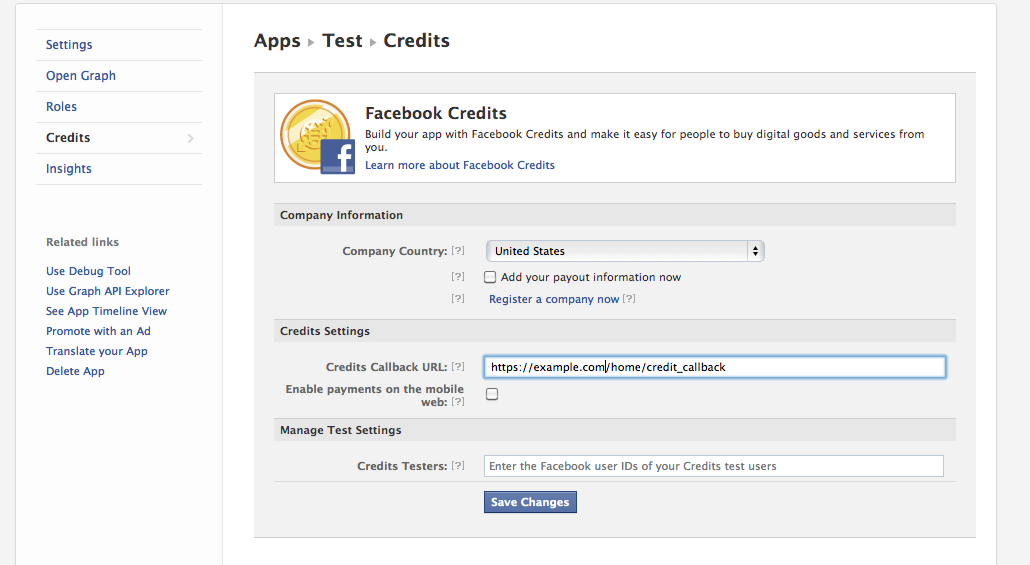
A couple months ago, I tried to integrate Facebook credits with a very simple Rails Facebook App. What a mess! The process is complicated, poorly documented, and hopelessly confusing. Now, I’m thinking I should make a post showing what I did to get it working. My goal here is to give people a resource they can use to integrate credits with their Facebook applications.
Prerequisites
- You have a Rails Facebook canvas app.
- Your app should be in some sort of production environment. For this example, I did it with Heroku. It just won’t work in development mode with a local connection.
- You have read (or at least skimmed) the documentation on Facebook credit integration at https://developers.facebook.com/docs/credits/build/.
- some clients-side JavaScript in one of your views to initiate and handle the interaction with Facebook’s API
- some server-side Rails script to handle the credit callback.
     <div id="fb-root"></div>
     <script src="http://connect.facebook.net/en_US/all.js"></script>
     <script>
          FB.init({appId: "<YOUR_APP_ID>", status: true, cookie: true}); //insert your app_id
          function placeOrder() {
          // If using mobile, this is where you place the
          // iOS native app check for credits (see below)
          // Assign an internal ID that points to a database record
          var order_info = 'ORDER_INFO'; //write this to something you can use to identify the item to be purchased
          // calling the API ...
          var obj = {
          method: 'pay',
          order_info: order_info,
          action: 'buy_item',
          dev_purchase_params: {'oscif': false}
          };
          FB.ui(obj, callback);
          writeback("thanks");
          }
        var callback = function(data) {
        if (data['order_id']) {
             return true;
        } else {
        //handle errors here
        return false;
        }
        };
     function writeback(str) {
          window.location = str;
     }
     </script>

<p> <a onclick="placeOrder(); return false;">Click here to start the dialogue.</a></p>
class HomeController < ApplicationController
  def index
  end

 def credit_callback
   #This block is executed when order_details is present, which means the user just confirmed a payment.
   #Here, you can run any commands that you would associate with a successful payment.
   #Must return a json facebook_status_ticket at the end of it all.
   if params[:order_details]
     order_details = ActiveSupport::JSON.decode(params[:order_details])
     order_id = order_details["order_id"].to_s
     facebook_status_ticket = {
       "content"=>{
         "status"=>"settled",
         "order_id"=>order_id
       },
       "method"=>"payments_status_update"
     }
     render(:json=>facebook_status_ticket)

   #This block is executed when order_details is not present.
   #You must render a json facebook_checkout_ticket with info about the product.
   else
     product_info = {
       "item_id"=>"MY_ITEM_ID",
       "title"=>"My Awesome Virtual Item",
       "price"=>1,
       "description"=>"Best. Virtual Item. Ever."
     }
     facebook_checkout_ticket = {
       "content"=>[product_info],
       "method"=>"payments_get_items"
     }
     render(:json=>facebook_checkout_ticket)
    end
  end
end
The credit_callback action handles two calls as the user goes through the dialogue flow. The first call does not have the parameter, “order_details.” When that parameter is absent from the call, we need to render a JSON facebook_checkout_item that has some information about the product to be purchased. This info will be used to populate the credits dialogue on the client-side. The second call has a paramater called “order_details.” When that parameter is present, the action needs to render a JSON facebook_status_ticket that shows the transaction has been completed. Once the facebook_status_ticket is received by the client, you’re done! The dialogue will close.
Conclusions: This could be better.
I speculate that once people see how the process works, their reaction will be the same as mine: “How can it be this complicated? How does this make sense?” In the future, I would like to build some sort of tool to simplify things, such as a gem. For now, however, we’re stuck with this.
 Travis Sheppard
Thanks you so much…I have suffered a lot about integration of facebook payment with ruby on rails application.
You’re welcome. I’m glad to know that I could help!