This week, I’m going to try to add some new kinds of graphs to quacky-charts. I think I’m going to start with bar graphs, using Rickshaw.js. I already have a little JS base to work from here: http://jsfiddle.net/ragingsquirrel3/HfAMc/. Now, it’s just time to coffeescriptize it, and get the server-side generators and builders up!
quacky-charts, one week in
Last week, I published a very basic version of quacky-charts, a gem that I’ve been working on. The goal of quacky-charts is to give Rails developers the ability to build pie charts using client-side tools (D3, for now), and configure them using a simple, Ruby syntax. My plan for quacky-charts is to make it work well for pie charts, and then try to add some additional chart and graph types once I’m comfortable with the pie chart builder. In the past week, I’ve accomplished some goals, including:
- some basic RSpec tests
- CoffeeScript D3 initialization drawing charts from data configured in the controller
- clean configuration syntax
Next week, I’m going to work on some additional features. Ideally, I’d like to get some sort of client-side testing framework in place.
Introducing quacky-charts, a gem to add D3 pie charts to Rails apps
I just started a new open-source project at https://github.com/ragingsquirrel3/quacky-charts. The goal is to provide a powerful, easy-to-use (and customize) tool for Rails developers to quickly add graphs to their apps. I know, there are a lot of tools out there already. However, I’ve found that most of the best tools (D3, Rickshaw.js) are JavaScript tools. I want to abstract these tools to move the configuration to Ruby. It will be perfect for Rails developers who don’t have the time or experience to configure these tools on the client-side.
Although the basic functionality is already there, it’s still VERY much a work in progress. So far, it only draws pie charts with random data. That will change very soon. Here are some things I want to achieve as soon as possible:
- the ability to configure data from the controller, and have the chart draw itself based on that data
- rspec testing
- additional graph types
Stay tuned for updates!
Simple D3 Pie Chart Example
All the D3 pie chart examples out there are pretty complicated and crowded with features you probably don’t want. Here’s an example of one that’s pretty basic: http://jsfiddle.net/ragingsquirrel3/qkHK6/. I’m still working to make it simpler.
It’s based on this example: https://github.com/mbostock/d3/blob/master/examples/donut/donut.html.
Just for Fun: A Rails 3 Boilerplate with HAML, Mongoid, and Twitter Bootstrap
Lately, I’ve been exploring some tools that make life easier for Rails developers. I decided to make a boilerplate app that has a few of my favorite tools installed and ready to go. Specifically, this app has HAML, Mongoid, and Twitter Bootstrap. With these tools included, it is easy to develop powerful, beautiful Rails 3 apps.
In the future, I’d like to edit this boilerplate to include some additional tools. Eventually, I’d like to write a post, explaining how I installed these tools. For now, here’s the code: https://github.com/ragingsquirrel3/super-rails-boilerplate.
Video Tutorial: Put a Rails App on Heroku
This short video tutorial shows you how to put a Rails 3 app on Heroku.
Integrate Facebook Credits With a Rails App: Hello World! Is this real life?
A couple months ago, I tried to integrate Facebook credits with a very simple Rails Facebook App. What a mess! The process is complicated, poorly documented, and hopelessly confusing. Now, I’m thinking I should make a post showing what I did to get it working. My goal here is to give people a resource they can use to integrate credits with their Facebook applications.
Prerequisites
- You have a Rails Facebook canvas app.
- Your app should be in some sort of production environment. For this example, I did it with Heroku. It just won’t work in development mode with a local connection.
- You have read (or at least skimmed) the documentation on Facebook credit integration at https://developers.facebook.com/docs/credits/build/.
Overview
To integrate Facebook credits into your Rails app, you need two things:
- some clients-side JavaScript in one of your views to initiate and handle the interaction with Facebook’s API
- some server-side Rails script to handle the credit callback.
Step 1: Enabling Credits on Your App in Facebook Developer
Go to the Facebook Developer dashboard, and click on your app. Edit the app, and you should see a link on the left side that says, “Credits.” Click on it. To get started, you don’t need to fill in all the information. Just enter your country, and the callback URL. Here, the URL is simple home/credit_callback, assuming that there is a home controller, with a credit_callback action. Later, we’ll configure that action to handle callbacks and provide an appropriate response.
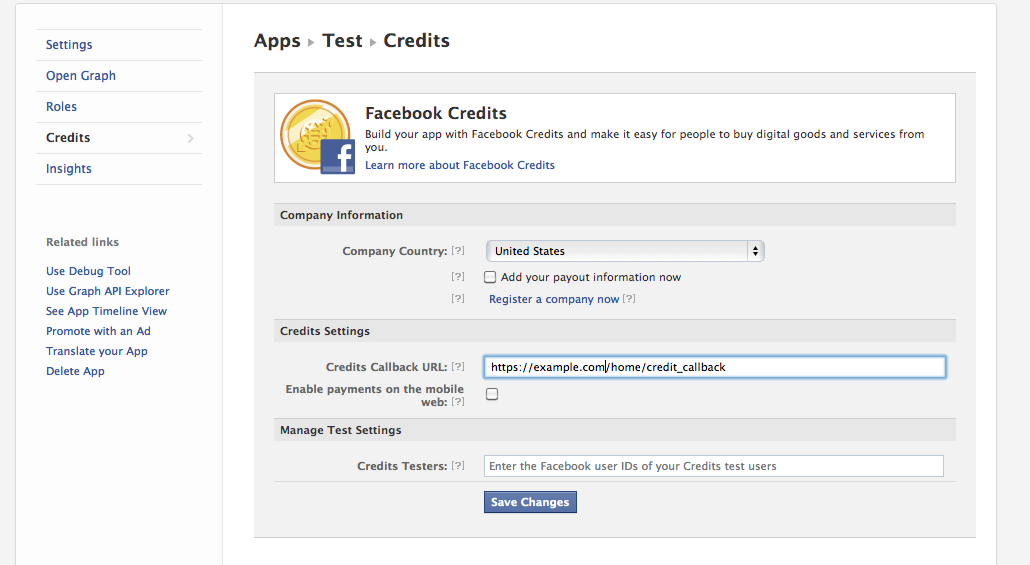
If you’re already lost, check out the official documentation at https://developers.facebook.com/docs/credits/build/. This part is actually described pretty well.
Step 2: Add FB JavaScript in the view to initiate the credit dialogue.
Go to a view from which you would like to begin the credit dialogue. Paste this code into the view:
     <div id="fb-root"></div>
     <script src="http://connect.facebook.net/en_US/all.js"></script>
     <script>
          FB.init({appId: "<YOUR_APP_ID>", status: true, cookie: true}); //insert your app_id
          function placeOrder() {
          // If using mobile, this is where you place the
          // iOS native app check for credits (see below)
          // Assign an internal ID that points to a database record
          var order_info = 'ORDER_INFO'; //write this to something you can use to identify the item to be purchased
          // calling the API ...
          var obj = {
          method: 'pay',
          order_info: order_info,
          action: 'buy_item',
          dev_purchase_params: {'oscif': false}
          };
          FB.ui(obj, callback);
          writeback("thanks");
          }
        var callback = function(data) {
        if (data['order_id']) {
             return true;
        } else {
        //handle errors here
        return false;
        }
        };
     function writeback(str) {
          window.location = str;
     }
     </script>

<p> <a onclick="placeOrder(); return false;">Click here to start the dialogue.</a></p>
Here, the dialogue is initiated by clicking on the p tag. You can initiate the dialogue with any JavaScript that works for you. When dialogue begins, it will also start running the writeback function. Here, it takes a string parameter.
Step 3: Configure Callback Action
All we need to do now is setup the callback action. Earlier, we set the path to home/credit_callback. Here, home_controller.rb has an action called, “credit_callback.” This is how my controller looks:
class HomeController < ApplicationController
  def index
  end

 def credit_callback
   #This block is executed when order_details is present, which means the user just confirmed a payment.
   #Here, you can run any commands that you would associate with a successful payment.
   #Must return a json facebook_status_ticket at the end of it all.
   if params[:order_details]
     order_details = ActiveSupport::JSON.decode(params[:order_details])
     order_id = order_details["order_id"].to_s
     facebook_status_ticket = {
       "content"=>{
         "status"=>"settled",
         "order_id"=>order_id
       },
       "method"=>"payments_status_update"
     }
     render(:json=>facebook_status_ticket)

   #This block is executed when order_details is not present.
   #You must render a json facebook_checkout_ticket with info about the product.
   else
     product_info = {
       "item_id"=>"MY_ITEM_ID",
       "title"=>"My Awesome Virtual Item",
       "price"=>1,
       "description"=>"Best. Virtual Item. Ever."
     }
     facebook_checkout_ticket = {
       "content"=>[product_info],
       "method"=>"payments_get_items"
     }
     render(:json=>facebook_checkout_ticket)
    end
  end
end
The credit_callback action handles two calls as the user goes through the dialogue flow. The first call does not have the parameter, “order_details.” When that parameter is absent from the call, we need to render a JSON facebook_checkout_item that has some information about the product to be purchased. This info will be used to populate the credits dialogue on the client-side. The second call has a paramater called “order_details.” When that parameter is present, the action needs to render a JSON facebook_status_ticket that shows the transaction has been completed. Once the facebook_status_ticket is received by the client, you’re done! The dialogue will close.
Conclusions: This could be better.
I speculate that once people see how the process works, their reaction will be the same as mine: “How can it be this complicated? How does this make sense?” In the future, I would like to build some sort of tool to simplify things, such as a gem. For now, however, we’re stuck with this.
Web Techies– Stop Being Pretentious and Embrace Content Management Systems
In my short career as a freelance web designer/developer, I’ve always “coded” all my projects. I avoided content management systems that could demystify the process of creating web content. As a Rails developer, I thought that I should use Rails whenever I could. Until now, even my own website was a Rails project, hosted on Heroku. I figured, “I’m a Rails developer, my website should be a Rails site.” I was wrong.
Just today, I shut down the Rails application that used to be my website, and put my entire site on WordPress. I’m having a blast, and couldn’t be happier with the way things are working, looking, and loading. For me, the paradigm shift is long overdue. From now on, all my static sites are going be hosted through a content management system, whenever possible. Plus, I can still embed my own HTML into WordPress, if I feel the urge.
As for actually having a dynamic site to show that I am, indeed, a Rails developer, my portfolio will have to speak for itself. Plus, content management systems for my simple sites will give me more time to focus on the more complicated ones that actually require Rails.
Coming soon: Getting Started with Heroku
Lately, I’ve been doing some research about getting Ruby on Rails apps running on Heroku. I’ve found some cool tricks and overcome some hiccups that are worth posting. Stay tuned for updates.
Hello world!
This is my very first blog post. I hope all goes well.
 Travis Sheppard